Web programming
Canvas, animations, APIs
Győző Horváth
associate professor
gyozo.horvath@inf.elte.hu
1117 Budapest, Pázmány Péter sétány 1/c., 2.408
Tel: (1) 372-2500/8469
Recap
Recap
- JavaScript language elements
- DOM programming
- Event management details
- Code organization
- Timers
- Forms, images, tables
- JavaScript built-in objects
Canvas API
Graphics possibilities in browsers
- Images
- CSS
- (Inline) SVG (vector graphics)
- Canvas (raster graphics)
Canvas
<canvas ✒>width="200" height="200"<✒></canvas>// Select canvas element
const canvas = document.querySelector('canvas');
// 2D drawing context
const context = ✒>canvas.getContext('2d')<✒;Canvas coordinate system
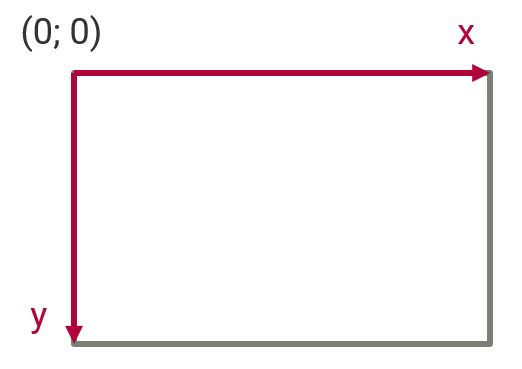
Drawing with shapes and images
CanvasRenderingContext2D methods:
- Text (
fillText,strokeText) - Rectangle (
fillRect,strokeRect) - Image (
drawImage)- Source: image, canvas, video
drawImage(image, x, y)drawImage(image, x, y, width, height)drawImage(image, sx, sy, sWidth, sHeight, dx, dy, dWidth, dHeight)
- Deletion (
clearRect)
Drawing with paths
beginPathclosePathfillstrokerectellipsearcmoveTolineTobezierCurveToquadraticCurveTo
Drawing with paths
context.fillRect(5, 5, 20, 100);
context.strokeRect(30, 5, 20, 100);

context.beginPath();
context.rect(110, 5, 20, 100);
context.moveTo(130, 5);
context.lineTo(160, 35);
context.lineTo(130, 65);
context.stroke();

context.beginPath();
context.arc(200, 50, 30, 0, 2 * Math.PI);
context.fill();

context.beginPath();
context.moveTo(5, 200);
context.quadraticCurveTo(55, 100, 105, 200);
context.closePath();
context.stroke();

context.beginPath();
context.moveTo(105, 200);
context.bezierCurveTo(105, 130, 200, 150, 200, 90);
context.lineTo(190, 90);
context.lineTo(200, 80);
context.lineTo(210, 90);
context.lineTo(200, 90);
context.stroke();
Settings
- Kitöltés színe/mintázata (
fillStyle) - Vonal színe (
strokeStyle) - Vonal vastagsága (
lineWidth) - Vonalak vége (
lineCap) - Vonalak illesztése (
lineJoin) - Áttetszőség (
globalAlpha) - Egyesítés és vágás
Example
const plane = document.createElement('img')
plane.src = 'plane.png'
plane.addEventListener('load', draw)
function draw() {
  const gradSky = ctx.createLinearGradient(200, 0, 200, 300)
  gradSky.addColorStop(0, 'lightblue')
  gradSky.addColorStop(0.5, 'orange')
  gradSky.addColorStop(1, '#444444')

  const gradMountain = ctx.createLinearGradient(200, 60, 200, 300)
  gradMountain.addColorStop(0, 'white')
  gradMountain.addColorStop(0.2, 'white')
  gradMountain.addColorStop(0.7, '#5555aa')
  gradMountain.addColorStop(1, 'green')

  ctx.fillStyle = gradSky
  ctx.fillRect(0, 0, 400, 300)

  ctx.beginPath()
  ctx.fillStyle = gradMountain
  ctx.moveTo(0, 300)
  ctx.lineTo(0, 200)
  ctx.lineTo(100, 100)
  ctx.lineTo(100, 100)
  ctx.lineTo(220, 160)
  ctx.lineTo(330, 60)
  ctx.lineTo(400, 100)
  ctx.lineTo(400, 300)
  ctx.closePath()
  ctx.fill()

  ctx.drawImage(plane, 30, 40, 70, 50)
}
Transformations
- Operations
rotatescaletranslatetransform
- State management
saverestore
Translation
context.translate(100, 100);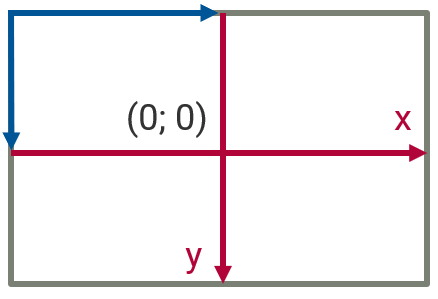
Scale
context.scale(2, 2);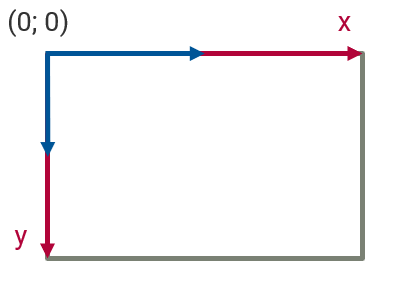
Rotation
context.rotate(Math.PI / 4);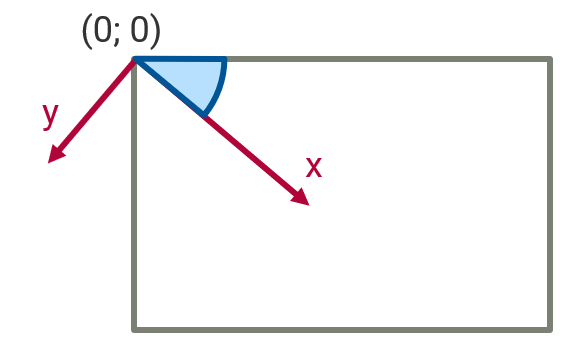
Complex transformation
context.translate(100, 100);
context.rotate(-Math.PI / 4);
// Draw something
context.rotate(Math.PI / 4);
context.translate(-100, -100);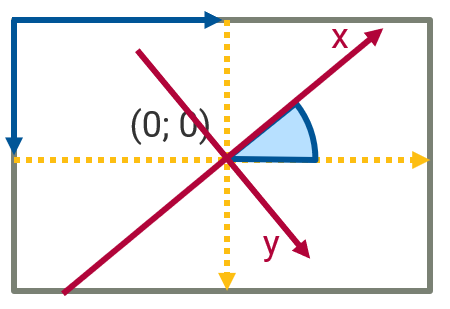
Transformation example
for (var i = 0; i < 3; i++) {
  for (var j = 0; j < 3; j++) {
    ctx.save();
    ctx.fillStyle = 'rgb(' + (51 * i) + ', ' + (255 - 51 * i) + ', 255)';
    ctx.translate(10 + j * 50, 10 + i * 50);
    ctx.fillRect(0, 0, 25, 25);
    ctx.restore();
  }
}
Animations
Animations
- Principle: redrawing the canvas quickly
- Draw changes
- Complete drawing
- clear the canvas
- drawing
- Model
- state space (data)
- view (drawing)
Animation loop
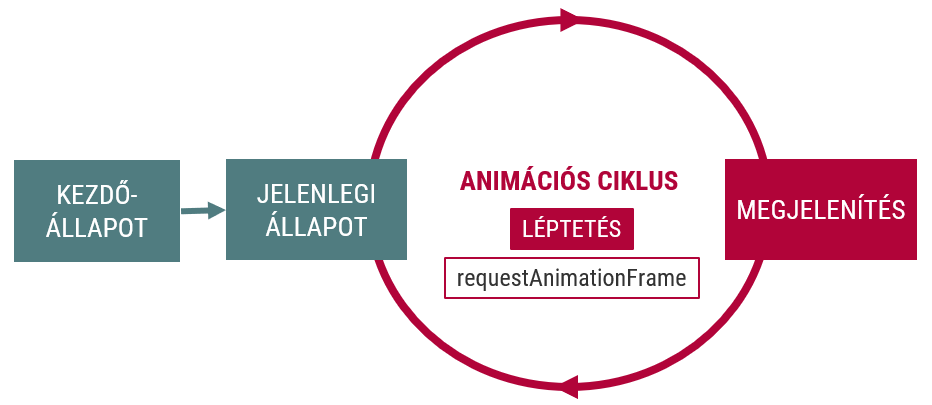
Animation loop
const state = /*...*/;

function next() {
  update(); // Update current state
  render(); // Rerender the frame
  requestAnimationFrame(next);
}

next(); // Start the loop

function update() { /* Change app state */ }
function render() { /* Draw app state   */ }
Time-based animation
State change is a function of elapsed time (e.g. physics)
let lastFrameTime = performance.now();
const state = /*...*/;

function next(currentTime = performance.now()) {
  ✒>const dt = (currentTime - lastFrameTime) / 1000;<✒ // seconds
  ✒>lastFrameTime = currentTime;<✒

  update(✒>dt<✒); // Update current state
  render(); // Rerender the frame

  requestAnimationFrame(next);
}

next(); // Start the loop
v = s / tds = v * dt
a = v / tdv = a * dt
Example
const box = {
  x: 50, y: 50,
  vx: random(50, 200), vy: random(50, 200),
  width: 30, height: 30,
}
function update(dt) {
  box.x += box.vx * dt
  box.y += box.vy * dt
  if (box.x + box.width > canvas.width) {
    box.x = 2 * (canvas.width - box.width) - box.x
    box.vx *= -1
  }
  if (box.x < 0) {
    box.x *= -1
    box.vx *= -1
  }
  if (box.y + box.height > canvas.height) {
    box.y = 2 * (canvas.height - box.height) - box.y
    box.vy *= -1
  }
  if (box.y < 0) {
    box.y *= -1
    box.vy *= -1
  }
}
function draw() {
  // clear
  ctx.clearRect(0, 0, canvas.width, canvas.height)
  // draw box
  ctx.fillRect(box.x, box.y, box.width, box.height)
}
Encapsulation
class Entity {
  constructor(canvas, context) {
    this.canvas = canvas
    this.context = context
    /* Initialize */
  }
  update(dt) {
    /* Update properties */
  }
  draw() {
    /* Render to canvas */
  }
}
Example
class Ball {
  vx = 500;
  radius = 20;

  constructor(x = this.radius) {
    this.x = x;
  }

  update(dt) {
    this.x += this.vx * dt / 1000;
  }

  draw(context) {
    context.beginPath();
    context.arc(this.x, this.radius, this.radius, 0, Math.PI * 2);
    context.fill();
  }

  bounceBack() {
    this.vx *= -1;
  }
}
Spritesheet animation
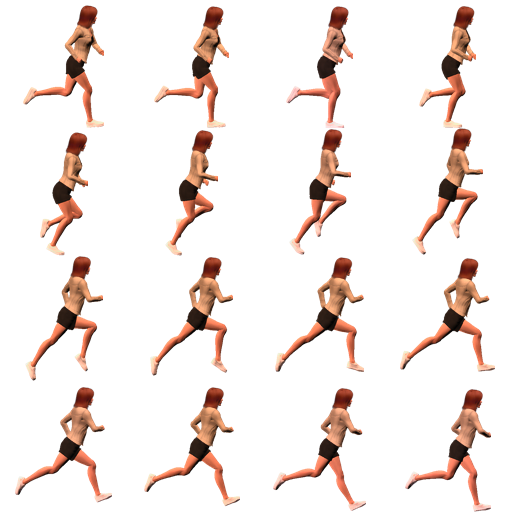
Spritesheet animation
const sprite = {
  currentFrame: 0,
  image: new Image(),
  frameCount: 16,
  frameTime: 0.03,
  elapsedTime: 0,
}
function update(dt) {
  sprite.elapsedTime += dt
  if (sprite.elapsedTime > sprite.frameTime) {
    sprite.currentFrame = (sprite.currentFrame + 1) % sprite.frameCount
    sprite.elapsedTime -= sprite.frameTime
  }
}
function draw() {
  // clear
  ctx.clearRect(0, 0, canvas.width, canvas.height)

  // draw sprite
  const spriteX = sprite.currentFrame % 4;
  const spriteY = Math.floor(sprite.currentFrame / 4);
  ctx.drawImage(
    sprite.image,
    spriteX * 128,          // Source X
    spriteY * 128,          // Source Y
    127,                    // Source width
    127,                    // Source height
    canvas.width / 2 - 64,  // Target X
    canvas.height / 2 - 64, // Target Y
    128,                    // Target width
    128);                   // Target height
}
function init() {
  sprite.image.src = 'spritesheet.png'
  sprite.image.addEventListener('load', function () {
    next()
  })
}
init()
Sprite class
class Sprite {
  currentFrame = 0;
  timeSinceLastFrame = 0;
  loopCount = 0;

  constructor({
    image,
    width,
    height,
    spritesPerRow = 1,
    spritesCount = 1,
    frameDuration = 0.03,
    numberOfLoops = Number.POSITIVE_INFINITY,
    isAnimating = true,
  }) {
    this.image = new Image();
    this.image.src = image;
    this.imageWidth = width;
    this.imageHeight = height;
    this.spritesPerRow = spritesPerRow;
    this.spritesCount = spritesCount;
    this.frameDuration = frameDuration;
    this.numberOfLoops = numberOfLoops;
    this.isAnimating = isAnimating;
  }

  update(dt) {
    if (this.isAnimating) {
      this.timeSinceLastFrame += dt;

      if (this.timeSinceLastFrame > this.frameDuration) {
        const newFrame = (this.currentFrame + 1) % this.spritesCount;
        this.currentFrame = newFrame;
        this.timeSinceLastFrame -= this.frameDuration;
        if (newFrame === 0) {
          this.loopCount++;
        }
        if (this.loopCount === this.numberOfLoops) {
          this.isAnimating = false;
          this.currentFrame = this.spritesCount - 1;
        }
      }
    }
  }

  draw(context, targetX, targetY, width, height) {
    const sourceX =
      (this.currentFrame % this.spritesPerRow) *
      this.imageWidth;
    const sourceY =
      Math.trunc(this.currentFrame / this.spritesPerRow) *
      this.imageHeight;
    context.drawImage(
      this.image,
      sourceX, sourceY, this.imageWidth, this.imageHeight,
      targetX, targetY, width || this.width, height || this.height
    );
  }

  startAnimation() {
    this.isAnimating = true
  }
}
Animation with Sprite class
const sprite = new Sprite({
  image: "spritesheet.png",
  width: 128,
  height: 128,
  spritesPerRow: 4,
  spritesCount: 16,
  frameDuration: 0.03
});

let lastFrameTime = performance.now();

function next() {
  const currentTime = performance.now();
  const dt = currentTime - lastFrameTime;
  lastFrameTime = currentTime;

  context.clearRect(0, 0, canvas.width, canvas.height);

  ✒>sprite.update(dt);<✒
  ✒>sprite.render(context, 0, 0, 64, 64);<✒

  requestAnimationFrame(next);
}

next();
Extending Sprite
class Runner extends Sprite {
  direction = 1;
  x = 0;
  vx = 200;

  update(dt) {
    super.update(dt);
    ✒>this.x += this.vx * dt / 1000;<✒
  }

  render(context) {
    ✒>context.save();
    context.translate(this.x, 0);
    context.scale(this.direction, 1);
    super.render(context, -this.width, 0);
    context.restore();<✒
  }

  turnAround() {
    this.vx *= -1;
    this.direction *= -1;
  }
}
Spritesheet movement
const runner = new Runner({/*...*/});
let lastFrameTime = performance.now();
function next() {/*...*/}

function update(dt) {
  ✒>runner.update(dt);

  if (runner.x >= canvas.width || runner.x <= 0) {
    runner.turnAround();
  }<✒
}

function render() {
  ✒>runner.render(context);<✒
}
With a little graphics…
Games = Interactive animation
Global event handlers modify animation parameters
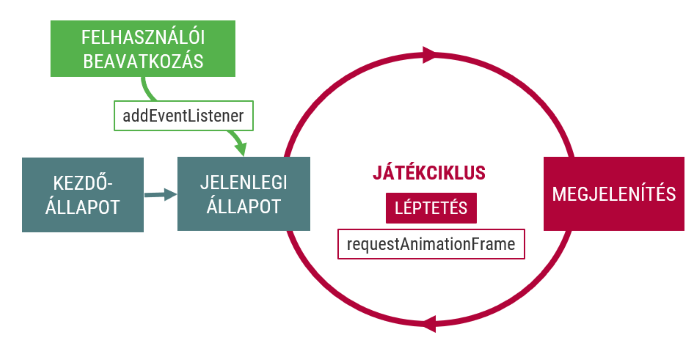
Interaction
isPointInPath()isPointInStroke()- ⚠ Hit
regions
addHitRegion()removeHitRegion()clearHitRegions()
Canvas 3D
Canvas with WebGL technology
const canvas = document.querySelector("canvas");
const webGl = canvas.getContext("webgl");
webGl.viewport(0, 0, canvas.width, canvas.height);
Demo
Inline SVG
<html>
  <svg width="300px" height="300px">
    <defs>
      <linearGradient id="myGradient" x1="0%" y1="100%" x2="100%" y2="0%">
        <stop offset="5%" stop-color="red"></stop>
        <stop offset="95%" stop-color="blue" stop-opacity="0.5"></stop>
      </linearGradient>
    </defs>
    <circle id="myCircle" class="important" cx="50%" cy="50%" r="100"
      fill="url(#myGradient)" onmousedown="alert('hello');"/>
  </svg>
</html>
Browser APIs
Browser APIs
APIs for accessing/handling resources
- BOM (Browser Object Model)
- Location API
- Geolocation API
- MediaDevices API
- File API
- …
The browser window
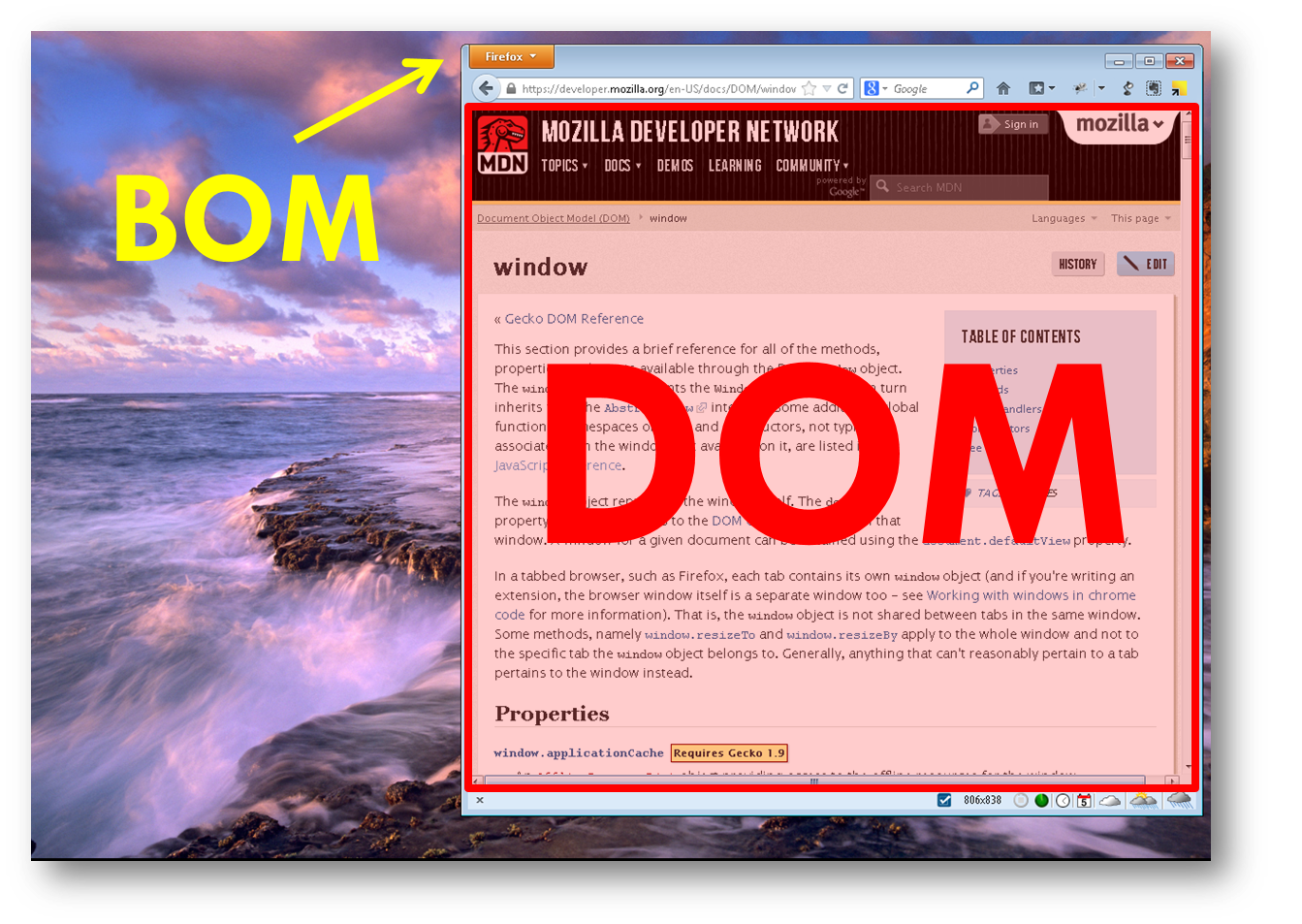
BOM (window)
- Window (tab) containing the DOM, context of JS
- Global namespace
- Window-related functions
- Place for many other APIs
- Browser Object Model (BOM)
- Reference
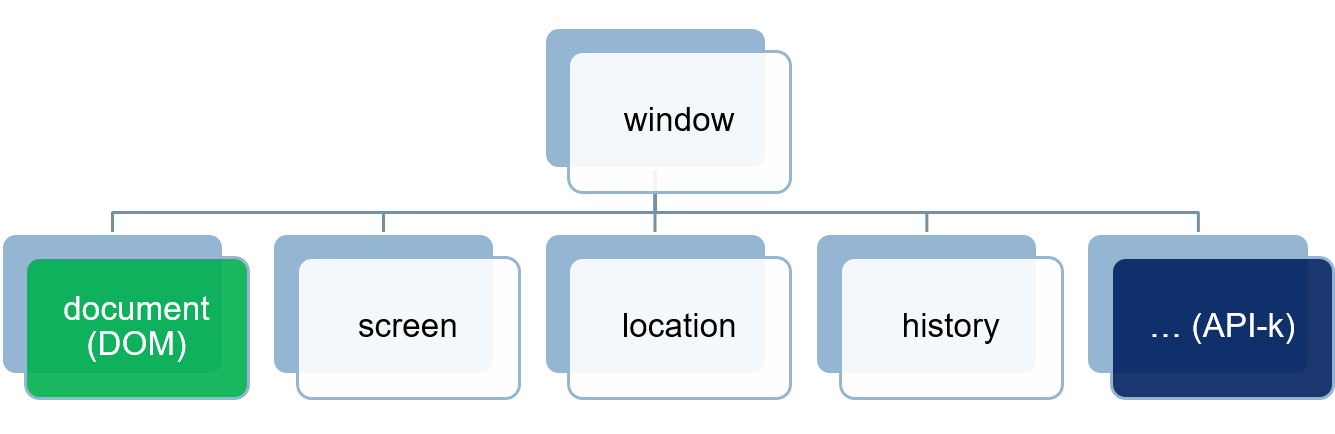
Global namespace
function hello() {
  console.log('Hello');
}
window.hello()

// Unintentional global variable
function sideEffect() {
    let aVeryBigVariable
    aVeryBigvariable = 12; // window.aVeryBigvariable
}
sideEffect()
console.log(aVeryBigvariable);
console.log(window.aVeryBigvariable);

// strict mode
function sideEffectStrict() {
    "use strict"
    let anotherVeryBigVariable
    anotherVeryBigvariable = 12;
}
sideEffectStrict()
console.log(anotherVeryBigvariable);
New window
window.open(),window.close()opener- The new window reference is a
windowobject
const options = "resizable,width=800,height=600,scrollbars=yes";
const elte = window.open("http://www.elte.hu", "ELTE", options);
elte.resizeTo(400, 200);
elte.document.querySelector("p");
elte.opener; // window
elte.close();Location API
- Reading the contents of the title bar
- Each part can be handled separately
hash,host,hostname,href,origin,pathname,port,protocol,search,username,password
// http://example.com:8080/page.html?name=value#anchor
location.href;      // the entire URL
location.host;      // "example.com:8080"
location.hostname;  // "example.com"
location.origin;    // "http://example.com:8080"
location.pathname;  // "/page.html"
location.port;      // "8080"
location.protocol;  // "http:"
location.search;    // "?name=value"
location.hash;      // "#anchor"
Location API
- Changing the URL
assign(newUrl): load new pagereplace(newUrl): overwrite the current onereload()
- Események
hashchange: change in the URL fragment
window.location = "http://www.elte.hu";
window.location.href = "http://www.elte.hu";
window.location.assign("http://www.elte.hu");
window.location.replace("http://www.elte.hu");
window.location.reload();
URLSearchParams
For processing the location.search parameter
const searchParams = new URLSearchParams(location.search);

searchParams.has("paramName");
searchParams.get("paramName");
searchParams.getAll("paramName");
searchParams.set("paramName");
searchParams.append("paramName", "paramValue");
searchParams.delete("paramName");History
Traversing the browser history
window.historyback()forward()go(n)
window.history.back();
window.history.forward();
window.history.go(-3);
History
Modifications
window.history.pushState(stateObj, name, url)window.history.replaceState(stateObj, name, url)window.onpopstateevent
window.onpopstate = function(e) {
  console.log("location: " + document.location + ", state: " + JSON.stringify(e.state));
};

history.pushState({page: 1}, "title 1", "?page=1");
history.pushState({page: 2}, "title 2", "?page=2");
history.replaceState({page: 3}, "title 3", "?page=3");
history.back(); // logs "location: http://example.com/example.html?page=1, state: {"page":1}"
history.back(); // logs "location: http://example.com/example.html, state: null"
history.go(2); // logs "location: http://example.com/example.html?page=3, state: {"page":3}"Iframe programming
- Supported, valid
- Window inside the window
- Separated environment
- sandboxing
- asynchronous communication
- Accessing
window.parentiframe.contentWindowiframe.contentWindow.document/iframe.contentDocument
- Same Origin Policy
postMessage
- Managed communication between windows
postMessage(),messageevent
<iframe src="http://localhost:8081/window.postmessage.iframe.html"></iframe>// parent window
window.addEventListener('load', function () {
const iframe = document.querySelector('iframe')
iframe.contentWindow.postMessage("message", "http://localhost:8081")
})
window.addEventListener('message', function (e) {
console.log(e.origin, e.data)
})// iframe
window.addEventListener('message', function (e) {
if (e.origin === "http://localhost:8080") {
console.log(e.data)
window.parent.postMessage('message back', 'http://localhost:8080')
}
})Further window properties
- Properties
namefullscreen
- Events
load,unloadabort,closecontextmenuresize,scroll,selectstoragecopy,cut,paste
- Methods
alert,confirm,promptatob,btoa(base64 encoding)matchMediaprintpostMessagestopfetch
Web workers
- True multithreading
- Communication: messages/events
// main thread
const worker = new Worker('other.js');
worker.onmessage = function(e) {
  console.log(e.data);
};
worker.postMessage('something');

//other.js
self.onmessage = function(e) {
  self.postMessage("Kapott adat: " + e.data);
};
Drag and drop
- Draggable object:
draggable="true" dragstart,dragenter,dragover,drop, etc eventsevent.dataTransfersetDatasetDragImageeffectAlloweddropEffect
- http://html5demos.com/drag
Drag and drop
draggableattributesdragstartevent: storing drag datadragoverevent: selecting dropzonedragleaveevent: leaving dropzonedropevent: dropdragendevent: drag data reset
Further HTML5 JavaScript APIs
- Media
- Offline applications
- Contenteditable
- Web sockets, Server Sent Events
- Geolocation
- File API (desktop), Filesystem
Media elements
Audio
- Playing audio files
HTMLAudioElement
<audio src="horn.wav" id="audio1" controls></audio>// existing element
document.querySelector('audio').play();
// in-memory element
const audio = document.createElement('audio');
audio.src = 'horn.wav';
audio.play();Video
- HTML
<video>tag HTMLVideoElement
Video
const canvas = document.querySelector('canvas')
const ctx = canvas.getContext('2d')
const video = document.querySelector('video')
const mainloop = function() {
  window.requestAnimationFrame(mainloop);
  ctx.drawImage(video, 0, 0, canvas.width, canvas.height)
}
mainloop()
Video
let deg = 0;
const mainloop = function() {
  window.requestAnimationFrame(mainloop);

  deg += 0.01
  ctx.clearRect(0, 0, canvas.width, canvas.height)
  ctx.save()
  ctx.translate(canvas.width / 2, canvas.height / 2)
  ctx.scale(0.5, 0.5)
  ctx.rotate(deg)
  ctx.drawImage(video, -canvas.width / 2, -canvas.height / 2, canvas.width, canvas.height)
  ctx.restore()
}
Video
Video
const canvas = document.querySelector('canvas')
const ctx = canvas.getContext('2d')
const image = document.querySelector('img')
const video = document.querySelector('video')
const red = document.querySelector('#red')
const green = document.querySelector('#green')
const blue = document.querySelector('#blue')

navigator.mediaDevices.getUserMedia({video: true})
.then(function(mediaStream) {
  image.src = mediaStream
  video.srcObject = mediaStream
  video.addEventListener('loadeddata', function () {
    video.play()
    mainloop()
  })
})
.catch(function(err) { console.log(err.name + ": " + err.message) })

const mainloop = function() {
  if (video.paused || video.ended) {
    return
  }
  window.requestAnimationFrame(mainloop);

  ctx.drawImage(video, 0, 0, canvas.width, canvas.height)
  processImage()
}

function processImage() {
  let frame = ctx.getImageData(0, 0, canvas.width, canvas.height);
  let l = frame.data.length / 4;

  for (let i = 0; i < l; i++) {
    let r = frame.data[i * 4 + 0];
    let g = frame.data[i * 4 + 1];
    let b = frame.data[i * 4 + 2];
    if (g > green.valueAsNumber && r > red.valueAsNumber && b > blue.valueAsNumber)
      frame.data[i * 4 + 3] = 0;
  }
  ctx.putImageData(frame, 0, 0);
}
Summary
- Canvas
- Animations
window(BOM)- JavaScript APIs
- Programming media elements